Revolutionize Tabletop 3D Mapmaking: Detailed 2D/3D printed maps and VTT integration for extraordinary adventures!
Latest Updates from Our Project:
Steam Next Fest Demo Coming Soon & Early Access Ahead 🚀
9 months ago
– Mon, Feb 02, 2026 at 03:25:59 PM
Hello everyone! 👋 Quick Update!
🚀 Master of Realms is coming to Steam Next Fest!
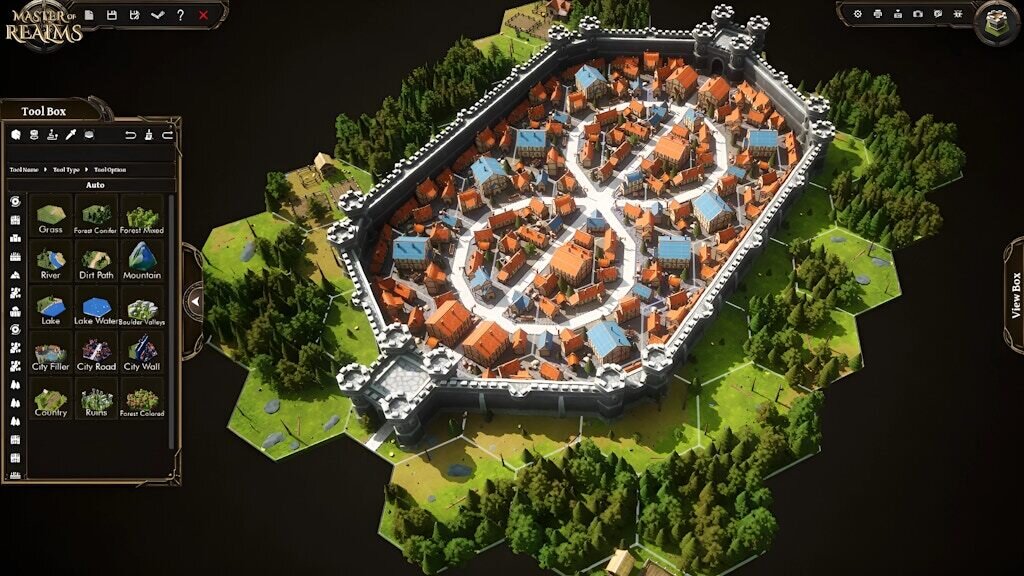
From February 5, you’ll be able to play free public demo during Steam Next Fest. This is your chance to jump into the map editor, try the core tools, and see how it fits perfectly into your tabletop RPG workflow. 🧙♂️🗺️
🎮 Demo highlights
✨ Access to the core editor features, with a limited tile set. 🖼️ Export maps in 2D formats (JPG, PNG, VTT) 🧩 Support for VTT 🖨️ 3D export (STL) for particle terrain previews and 3D printing
🗓️ Early Access is planned around March 26 We’ll share the exact launch date and the upcoming feature roadmap very soon! 📢
⭐ Don’t forget to wishlist Master of Realms on Steam So you’ll be notified as soon as the demo and Early Access go live!
🌍 Join us on this journey, we can’t wait to see what you create!
🔑 Early Access keys & lifetime licenses:
Final Early Access keys will be shared around the launch date. All backers from the Explorer tier up to the Master Merchant tier will receive their lifetime Master of Realms license. 🏆
📢 Join our Discord : It’s the best place to brainstorm map ideas and get quick advice!
💛 Because of your support, Master of Realms is coming to life.
From the bottom of our hearts, thank you for your continued support. It’s only because of this amazing community that we’re able to bring Master of Realms this far. We truly hope to keep building together like this. 🗺️🖨️✨
📜 Master of Realms — 0.9.1 Update
11 months ago
– Wed, Dec 03, 2025 at 10:28:10 AM
Our team has been working hard since the last update to make MoR more stable, smoother to use, and ready for the features coming next. This patch focuses heavily on fixes, polish, and preparing the base for future content.
🌈 Added / Unlocked
Apocalypse Theme unlocked
Cyberpunk Theme added
Dwarven, Elven and Modern Intersection tiles added
Improved Steam Workshop integration
Toolbox now opens by default
Default light altitude adjusted to 75% for better scene readability
Create your Apocalypse Wastelands!
Cyberpunk Cities and Slums are here!
🔧 Improvements
TileForge
TileForge meshes updated with fixed & reliable material assignments
Backend updates to ensure new Theme Objects save correctly
Overall editing stability improved
Visual & Theme Adjustments
Elf Theme:
City Ground readability improved
Dirt Path UVs fixed
Wall and path tile blending improved
Brightness issues corrected on several assets
Dwarf Theme:
City Road texture updated
Walls slightly brightened
Castle material issues corrected (was too dark)
Special tiles + rocks brightness adjusted
Core Theme:
City Ground texture scale increased
City Road texture updated
General:
Texture mask arrays updated for better performance
Wall material instance updated
🐛 Fixes
Fixed TileForge materials on older saved meshes
Fixed crash when switching to TileForge with objects selected
Fixed Themes' new Objects not saving correctly in TileForge
Fixed infinite loading when reloading the same map
Fixed Character getting stuck after resetting
Fixed Object collision disabling after deletion + undo
Fixed Rectangle Tool drawing inconsistencies
Fixed tiles drawing when clicking on the ViewCube
Fixed saving overriding undo/redo history slots
Fixed Tile Draw tool activating in TileForge via Shift + T
Fixed Castle Objects not saving correctly
Fixed hotkey hint mix-up between Brush Scale / Brush Density
Fixed several minor UI issues in TileForge’s saving screen
Fixed: Spawning multiple airports fixed
Fixed: Steam workshop Path
Fixed: Selection Tool Rotation bug
🔮 What’s Next
We’re continuing work on:
Adding more content, themes, and tiles
Improving visuals and materials across all themes
Expanding stability, optimization, and workflow features
Please make sure to update, report bugs, and stay patient — the team is working hard to push MoR forward. 💙
🚀 Master of Realms – Official Map-Making Contest Is LIVE! 🌍✨
11 months ago
– Tue, Nov 25, 2025 at 01:21:50 PM
Amazing Contest to showcase your Creativity!
Craft your world. Impress the realm. Win legendary prizes! 🏆
The Top 3 Maps will win the prizes shown in the campaign banner: A Resin 3D Printer, a Bambu Lab A1, and the 3D Maker Toolkit!
📢 Join our Discord — share your work-in-progress, get inspiration, and discuss strategies with other creators. It’s the best place to brainstorm map ideas and get quick advice!
If you have questions, just comment on this update — we’re here to help. Now go forge legendary, beautiful, and playable realms.
✨ Good luck, creators! 🔥
✨ November 2025 Update — Steam Release Announcement! New Themes, Improvements & What’s Coming Next ✨
11 months ago
– Tue, Nov 25, 2025 at 10:15:37 AM
Hey Realms Fam! November brings one of the most content-packed updates we’ve released so far. New themes, new tiles, new objects, major UX upgrades, visual improvements, and the long-awaited object color-changing system are finally here. Let’s get into it. ✨
HexCrafter now comes with a large collection of Blank Tiles, giving you total creative freedom. Whether you want to build custom regions, design unique biomes, carve out your own roads, draw rivers exactly where you want them, or shape entire cities from scratch — the blank tiles let you create maps entirely your way.
We’re also crafting Cyberpunk and Darkland themes, both coming soon and planned for the Early Access release. These new realms will bring fresh styles, moods, and worldbuilding options to MoR. --------------------------------------------------------------------------------
🎨 Further Material & Visual Improvements
We’ll continue polishing materials, lighting, and theme consistency.
As we move toward launch, we want to set expectations clearly:
We might not release any intermediate updates prior to the launch window, except for a few remaining content and theme updates, as well as essential hotfixes that are crucial for stability testing or critical fixes. The focus now is ensuring MoR is polished, stable, and fully prepared for its release phase.
Steam Early Access Release Window:
🗓️ Q1 2026 — Master of Realms will be launching on Steam in Early Access during the first quarter of 2026.
We’ll share more details, including final keys, DLC entitlements, and the roadmap, closer to launch.
🔥 Support Our Steam Launch — Wishlist Master of Realms! 🔥
Next Update Important Message:
We want to continue supporting and adding content to Master of Realms for years and years, but to be able to do that, we need a successful launch. And you can help with that!
There are several things you can do to help us launch successfully:
Spread the word on Twitter, Facebook, Instagram, TikTok, Reddit, …
Contact your favourite YouTubers or Twitch streamers and tell them about Master of Realms. Streams and videos of popular influencers can help A LOT at launch.
Your support, feature feedback, and testing energy continue to shape Master of Realms every single week. This update is a huge step toward the final release, and we’re excited for what’s next.
🚀September 2025 Update 🚀: 🧰 TileForge Is Here! + Steam Release Announcements 📢
about 1 year ago
– Wed, Sep 17, 2025 at 05:03:35 AM
Hey Realms fam!
We’ve been a bit quiet since the July mega update—because we’ve been heads‑down building. Today we’re rolling out new tools, navigation upgrades, clearer docs, and important Steam release clarifications. Let’s get into it. ✨
See Detailed Video Link Inside the update. __________________________________________________________________________
Meet TileForge—our in‑editor tile customizer for Hex Crafter that lets you craft custom tiles and tile groups.
TileFoge is Here!
Where to find it: Open Hex Crafter and use the top menu icon, or jump to the new “Custom Tiles” tab in the Toolbox.
Switch and Create the tile you like!
How it works:
Create a tile or group with the look you want—mix terrain types, blend materials, place props
Save—your creations appear in Toolbox → Custom Tiles for instant reuse
Edit anytime via the Edit button (top‑right of each thumbnail)—iterate without losing placements
Tiles are Editable!
Publish to Steam Workshop to share your creations with the community
You can Publish your tiles to Steam Workshop Too!
⚠️ Clarification: TileForge ≠ STL Forge. TileForge is for in‑engine customization inside Hex Crafter. STL Forge is a separate (coming soon) tool focused on printable tiles. TileForge tiles are not 3D Printable.
The VIP Backers names list is now live in the in‑app Credits page. This is a small way of saying thank you to the folks who helped us get here.
What’s included: The names we have on record from backer surveys and fulfillment exports for VIP tiers.
Missing or incorrect? Please open a ticket in Discord → #support with your preferred display name and backer email, and we’ll update it in the next refresh.
Privacy options: If you’d like your name removed or shown as initials, let us know via #support and we’ll honor it.
Ongoing updates: We’ll periodically refresh the list as we process survey updates and late confirmations.
Our Discord Viewers have been enjoying the Sneak Peeks of the Themed Tiles that will be added soon, but here are Modern and Apocalypse Sneak Peeks for everyone:
👉 Join our Discord and check out the #sneak-peek channel to see them all. 🔗 Discord
You can also follow our social channels to catch the latest previews and updates. ________________________________________________________________________________________________
🧨 Steam Release — Clarifications
To set expectations and reduce confusion:
Final Steam keys: You will receive permanent product keys (separate from playtest keys) at release. These add the base product to your library.
DLC entitlements: Themes & feature DLCs are already granted for Kickstarter backers via BackerKit according to pledge tier. Expect a second email with DLC keys at release (keys may arrive within a short window; they’re tied to your pledge).
Backer access: All backers will receive the Steam release according to their pledge‑tier benefits. If your tier includes specific themes/features, those will be included via DLC keys.
Kickstarter “Delivered” status: We are considering marking the Kickstarter as Delivered at the time of the Steam release to reflect fulfillment of your pledged rewards via Steam keys. This will not stop updates—we’ll continue shipping improvements, fixes, and any content you’re entitled to. You’ll keep receiving updates to everything you’ve received, of course.
If your email has changed or you don’t receive keys at launch, please open a ticket in Discord → Support so we can reissue promptly. ________________________________________________________________________________________________
🗺️ Create, Share, Get Featured
With TileForge + Hex Crafter, you can now build faster and smarter:
Combine core themes with your own custom sets to prototype biomes
Reuse saved groups across projects to speed up workflows
Post screenshots in Hall of Exhibits on Discord for a chance to be featured in #🐐‑vault‑of‑legends
Tag us on socials—community spotlights are live and ongoing
We’re getting very close to the Steam launch phase. From a small prototype to a growing toolkit, we’ve only reached this milestone because you believed in the vision.
As noted above, we’re considering marking the Kickstarter as Delivered alongside the Steam release to reflect fulfillment through your keys. That doesn’t end development—we’ll keep rolling out updates, improvements, and any pledged content you’ve received.
Thank you for riding along—testing builds, sending feedback, and cheering us on. 🙌 Please keep sharing your thoughts and creations; your support is what turns the future of Master of Realms into reality. 💙
We use essential cookies and our own first-party analytics to run BackerKit. With your consent, we also use cookies to measure our marketing and share data with advertising partners to show you relevant ads. Accept to allow all cookies, or reject to turn off the optional ones.
Read our cookie policy.